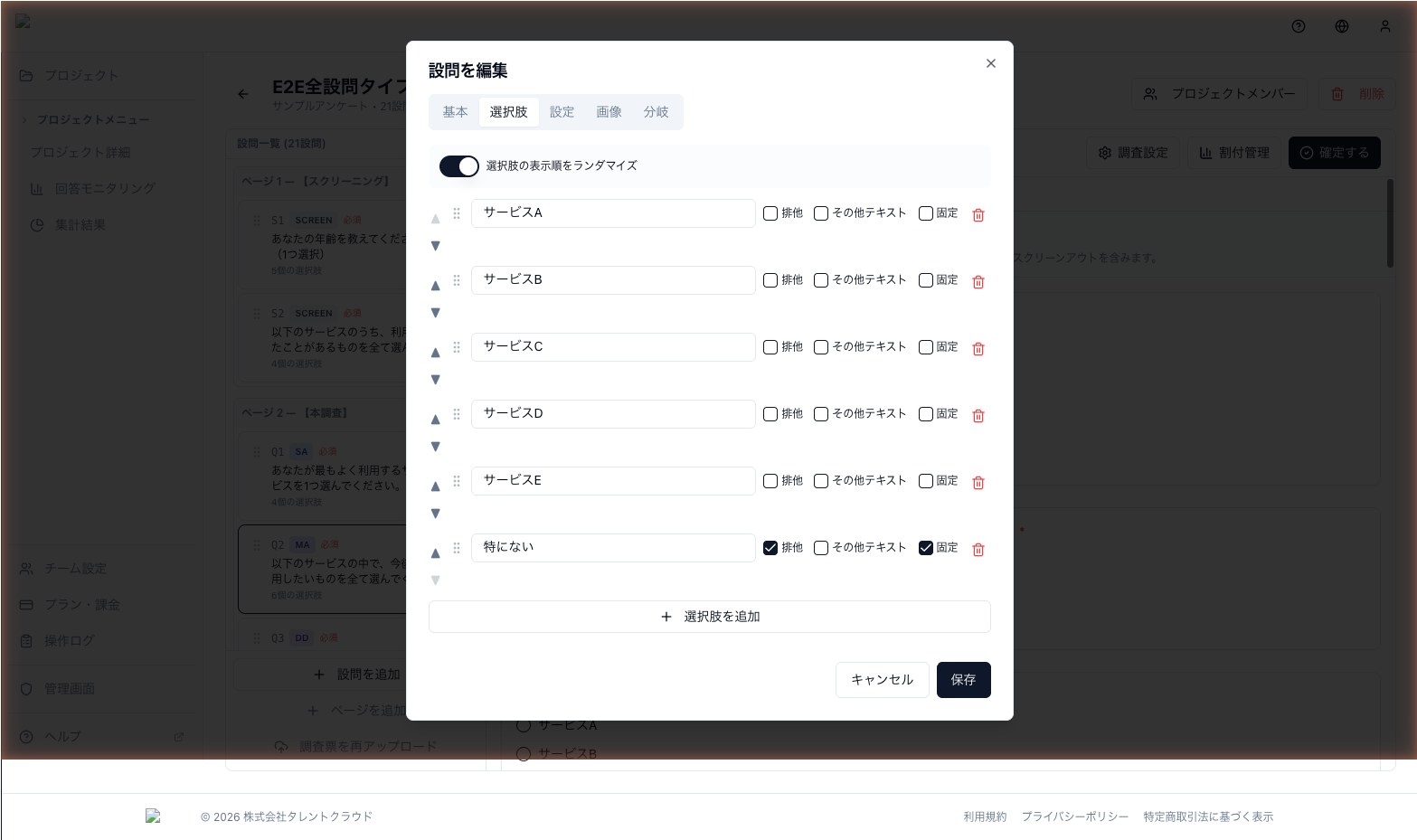
Choice Randomization
Eliminate order effects by randomizing choice order for each respondent, with support for pinning special options.
Choice randomization displays the answer options in a different order for each respondent. When options always appear in the same order, the ones at the top get chosen more often (the primacy effect). Randomization is the simplest defense against this bias.
When to use it
- Brand awareness studies where you don't want specific brands to always appear first
- Evaluation questions (likability, appeal) where order should not give any option an advantage
- Screening questions where you want to detect fraudulent "top-down selection" patterns
How to set it up
- Open the Choices tab of the question editor
- Turn on the Randomize toggle
- Add pinning settings if needed
The order is generated per respondent session and rendered consistently across page reloads.
Pinning
Options like "Other", "None of the above", and "Don't know" should normally stay at the end of the list. kicue lets you pin individual choices so they are excluded from randomization and appear in a fixed position.
- Pin to top — always rendered first, excluded from randomization
- Pin to bottom — always rendered last, excluded from randomization
Row randomization (matrix questions)
For matrix-style questions, you can randomize the rows per respondent. This is especially useful when asking about multiple brands or attributes in parallel.
Columns (scale labels, etc.) are not randomized.
How it works
The randomized order is generated once per respondent session and preserved throughout the survey. Reloading the page does not change the order, so respondents never see a shuffling list.